What you get
Three things IRIS already does, joined end to end: she pushes each session summary into your agent’s memory as it finishes; your agent reaches outside tools through MCP; and your agent can ask you a yes-or-no question on the lens.
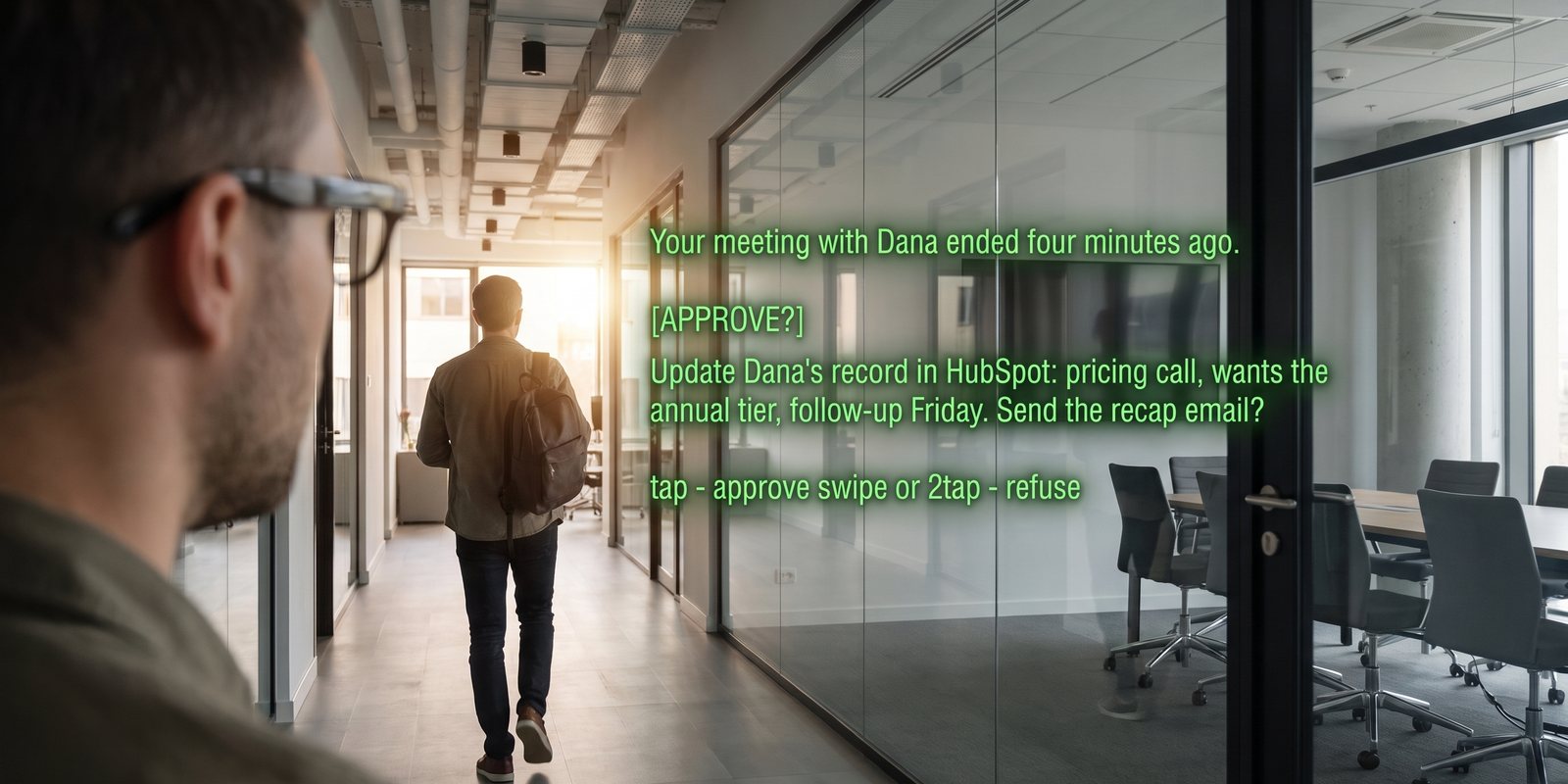
Illustration of the lens approval. The summary text is written by your agent.
- The session ends, the summary leaves. Same moment IRIS exports to Drive or Obsidian, the summary goes into the agent’s long-term memory. No button.
- The agent does the filing. Finds the contact, adds the notes, sets the next step. Through whatever MCP server you registered — HubSpot, Notion, Salesforce, Google Sheets, Airtable, or a Markdown folder.
- Anything that leaves your account waits for you. Sending the recap email is the kind of thing you want to see first. The agent asks, the question shows on your lens, and a tap is the answer. Refusal is the default if you never see it.
Set it up
- A real agent, connectedHermes or OpenClaw under Settings → Connections → Your agent. This recipe does not work with a plain model (“Other model”) — a model has no memory to push into and no tools to file with. Connect your agent starts from nothing.
- Switch on both toggles under the agentAuto-send sessions to [your agent] memory — each summary is pushed as it finishes. Let your agent write to your lens — this is also what allows it to ask for approval.
- Give the agent the tool for your CRMMCP is how an agent gets a new capability. For Claude Code under OpenClaw, one line each — pick the one you use:
# HubSpot (official)
claude mcp add --transport http hubspot https://mcp.hubspot.com
# Notion (official)
claude mcp add --transport http notion https://mcp.notion.com/mcp
# Google Sheets / Docs / Gmail (the same server as the spreadsheet guide)
claude mcp add --transport stdio gworkspace -- uvx workspace-mcp --tool-tier core
Thenclaude mcp list, and/mcpinside a session to sign in. The exact server URLs move — take them from each vendor’s MCP page rather than from here if one fails. Hermes has its own MCP configuration in its docs; OpenClaw passes MCP tools through to Claude Code withbundleMcp: true. - Write the standing instructionIn the agent’s system prompt or memory:
When a new IRIS session summary arrives in memory: 1. Identify the people in it. For each one that exists in HubSpot, add a note with the summary and set the next-step date if one was agreed. If they do not exist, create the contact with what you know. 2. Draft a short recap email to the main person, in my voice. 3. Before sending it, ask me: POST https://iris.eveniris.com/agent/approval with {"key": "<my licence key>", "summary": "<one line: who, what, send?>", "timeoutSec": 300}. Then poll GET https://iris.eveniris.com/agent/approval?key=…&id=… every 10 seconds. Send ONLY if status is "approved". Anything else means no. Never send email without that approval. - Run one real meetingRecord a short conversation, let her finish writing up, and watch your agent’s log. The approval question appears on the lens during your next session, or straight away if you are still in one. Tap. Check the CRM.
Good to know
- The approval is yes-or-no, once. Tap approves; a swipe or double-tap refuses; it expires after the timeout you set (30 seconds to 10 minutes, two minutes if you say nothing). Expired, unseen, app closed — all mean no. An answer cannot be changed afterwards.
- Approvals are exempt from Pause cues — they are the one thing that still gets through — but they do need IRIS open on the phone to be fetched.
- Only the summary leaves. The transcript stays in IRIS unless you send it yourself with the session-to-agent button during a live session.
- Start with the filing, add the email later. Let it write to the CRM for a week before you let it draft mail. You will learn what it gets wrong cheaply.
+
More recipes
Eight things IRIS can already do that most people have not switched on — four with your own agent, four with nothing but the phone.
Long jobs from the lensKick off a build, a report, a scrape — walk away — and the result appears on your lens.Inbox on the lens“Anything from the landlord?” — answered from your real Gmail, without touching the phone.Expert cues from your agentPoint a mode at an agent that knows your codebase, wiki or vault, and it comments live while you talk.Home Assistant as a bridgeNot just lights: scripts, scenes, automations and any web hook you wrap in one, from “Hey Even”.Reminders as triggers“Remind me at four” arrives as an email — and an email can become a phone alert, a task, or a webhook.Voice to-dos into TodoistA “remember to…” on the glasses lands in your Todoist or Google Tasks, and ticking it off there ticks it off in IRIS.Ask your documents by voiceAdd the PDF once. Then “Hey Even, what’s the notice period?” is answered from it, on the lens.All recipesThe index, with the spreadsheet guide and the agent guide.